Instructor: Yuki Oyama, Prprnya
The Christian F. Weichman Department of Chemistry, Lastoria Royal College of Science
This material is licensed under CC BY-NC-SA 4.0


In the last lesson, we focused on clean, customizable plots in Matplotlib using simple functions (with a brief look at an IR spectrum, but without handling it in detail). Real experimental work, however, is rarely so tidy—measurements carry noise, instruments have limits, and data often needs statistical treatment before it can be trusted. In this lesson, we will learn how to handle real-world data: importing it from files, exploring its structure, and visualizing it effectively. We will also practice fitting models to data, a key step in extracting meaningful parameters from experiments. Along the way, we’ll introduce basic statistical tools—mean, standard deviation, error bars—that help us evaluate both the data and the quality of our fits.
Reading and Writing Files
As usual, we start by importing the necessary modules.
import numpy as np
import matplotlib.pyplot as plt
Before we can analyze data, we need to load it from a file. The np.loadtxt function is a convenient way to read a text file into an array. Its general form is np.loadtxt(filename, delimiter, skiprows), where:
filenameis the path to the file (as a string),delimiterspecifies how columns are separated, andskiprowstells NumPy how many header lines to ignore.
As an example, let’s read the first ionization energies () of elements 1–103 from a .csv file named first_ionization_energy.csv, which is stored in the same directory as this notebook.
Data is taken from: Weller, M.; Overton, T.; Rourke, J.; Armstrong, F. A. Inorganic Chemistry; Oxford University Press: Oxford, 2018. ISBN 9780198768128.
ie1 = np.loadtxt('./assets/first_ionization_energy.csv', delimiter=',', skiprows=1)
ie1
You should always check your original data before reading it! They may have a (or more than one) row of header information, which you should skip. Also, the delimiter may be different from the comma, so you should check and state it explicitly.
It is not quite informative if we just print the array. Let’s do some plotting—feel the power of Matplotlib!
plt.figure(figsize=(14,6))

plt.plot(ie1[0:,0], ie1[0:,1], color='red', marker='o', mfc='white', ms=5)
plt.title('First Ionization Energies of Elements')

plt.xlabel('Atomic Number')
plt.ylabel('First Ionization Energy (eV)')

plt.xticks(np.arange(1, 104, 10))

plt.grid(linestyle=':')

plt.show()
Sometimes, the data you want to read may contain missing values. Try to load the electron_affinity.csv file, which contains the electron affinities of elements in first four periods:
ea = np.loadtxt('./assets/electron_affinity.csv', delimiter=',', skiprows=1)
ea
Oh... another error! Take a look of the electron_affinity.csv file—you should see that for , , and the whole 1st TM region, the electron affinity data is missing. Actually, np.loadtxt cannot read files with missing values. You can use np.genfromtxt instead, which is a more flexible version of np.loadtxt. In case there is a data missing, np.genfromtxt will automatically fill in the missing values with np.nan—a special value that represents missing data.
Data is taken from: Weller, M.; Overton, T.; Rourke, J.; Armstrong, F. A. Inorganic Chemistry; Oxford University Press: Oxford, 2018. ISBN 9780198768128.
# the `skiprows` argument is changed to `skip_header` for `np.genfromtxt`
ea = np.genfromtxt('./assets/electron_affinity.csv', delimiter=',', skip_header=1)
ea
Let’s plot the electron affinities to see how plt.plot handles np.nan.
plt.figure(figsize=(8,4))

plt.plot(ea[0:,0], ea[0:,1], color='green', marker='o', mfc='white', ms=5)

plt.title('Electron Affinities of Some Elements')

plt.xlabel('Atomic Number')
plt.ylabel('Electron Affinity (eV)')

plt.xticks(np.arange(1, 37, 5))
plt.xticks(np.arange(1, 37, 1), minor=True)

plt.grid(linestyle=':')

plt.show()
However, if you want to do some data analysis, the np.nan may cause problems. You may want to change it to a designated value, such as 0. You can do this by using the filling_values argument of np.genfromtxt.
ea = np.genfromtxt('./assets/electron_affinity.csv', delimiter=',', skip_header=1, filling_values=0)
ea
Let’s say that you want to export this modified data to a new .csv file. You can use the np.savetxt function to do this. It takes two key arguments: fname and X, which are the name of the file and the data to be saved.
np.savetxt('./output/electron_affinity_modified.csv', ea, delimiter=',')You should see a new file named electron_affinity_modified.csv in the output directory.
There are lots of methods to load and save data. You can find them in the documentation: loading files, loading files with missing entries, and saving files.
Exercise : Load the UV-Vis data of azobenzene (data from the NIST Chemistry WebBook) and plot the UV-Vis spectrum. The data is stored in the file 103-33-3-UVVis.jdx.
Hint: First check your data! Open it in notebook software and see what it looks like.
More on Plotting
Annotations
The plot you made from the data looks really nice, right? The trend shown in this figure is really easy to interpret—you might recall from high school chemistry that the first ionization energy generally increases across a period, with some particular exceptions. For example, the of is , while that of is only . Similar irregularities appear between and . It’s a good idea to label these elements explicitly so that first-time learners can easily spot these element-pairs of exceptions. This can be done with the plt.annotate() function. This function is a bit more complicated but very powerful. It takes a lot of arguments:
plt.annotate(text, xy, xytext, arrowprops)At minimum, it requires two arguments: text, the text string to display, and xy, the coordinates of the point you want to annotate. For example:
plt.annotate('Be', xy=(4, 9.321))This will add a text label at the point (4, 9.321). Here, the xy argument is a tuple of two numbers, which specifies the coordinates of the point you want to annotate. This coordinate is in the same coordinate system as the plot, which is the same as the axes. You can also specify the position of the text itself (so it doesn’t overlap the data point or your plot) using the xytext argument, and draw an arrow from the text to the data point with the arrowprops argument. For example:
plt.annotate('Be', xy=(4, 9.321), xytext=(7.5, 8), arrowprops=dict(facecolor='black', shrink=0.05))This will add a text label at the point (4, 9.321), with the text positioned at (7.5, 8), and with an arrow pointing from the text to the data point. You may notice that the arrowprops argument is a also complex, which contains a number of options for customizing the arrow. For example, you can change the color of the arrow with the facecolor argument, and change the size of the arrow with the shrink argument. Let’s see an example of this in action:
plt.figure(figsize=(14,6))

plt.plot(ie1[0:,0], ie1[0:,1], color='red', marker='o', mfc='white', ms=5)
plt.title('First Ionization Energies')

plt.xlabel('Atomic Number')
plt.ylabel('$I_1$ (eV)')

plt.xticks(np.arange(1, 104, 10))

plt.grid(linestyle=':', color='green', alpha=0.5)

plt.gca().spines['right'].set_visible(False)
plt.gca().spines['top'].set_visible(False)

arrowset = dict(facecolor='black', width=0.1, headwidth=5, headlength=5, shrink=0.05) # this can save a lot of typing when using the same arrowprops for multiple annotations

# Add annotations for Be and B
plt.annotate('Be', xy=(4, 9.321), xytext=(7.5, 8), arrowprops=arrowset)
plt.annotate('B', xy=(5, 8.297), xytext=(6, 6), arrowprops=arrowset)

# Add annotations for N and O
plt.annotate('N', xy=(7, 14.530), xytext=(5, 16), arrowprops=arrowset)
plt.annotate('O', xy=(8, 13.620), xytext=(7.5, 12), arrowprops=arrowset)

plt.savefig('./output/first_ionization_energy.pdf')
Some of the arguments of plt.annotate and arrowprops are listed in tables below.
Key arguments of
plt.annotate
| Argument | Type / Example | Description |
|---|---|---|
text | 'Label' | The annotation text to display. |
xy | (x, y) | Coordinates of the point being annotated. |
xytext | (x_text, y_text) | Position of the annotation text. If omitted, text appears at xy. |
arrowprops | dict(...) | Dictionary of properties to draw an arrow from text to the annotated point. |
Common keys for
arrowprops
| Key | Type / Example | Description |
|---|---|---|
width | 1.5 | Thickness of the arrow line. |
headwidth | 2 | Width of the base of the arrow head. |
headlength | 5 | Length of the arrow head. |
shrink | 0.05 | Fraction of total length to shrink from both ends. |
Besides these, common arguments like color can also be used here.
Arbitrary Texts
Putting arbitrary texts on a plot is quite similar to putting annotations. The only difference is that you need to use the plt.text() function instead of plt.annotate(). The syntax of plt.text() is a little bit different from plt.annotate(), but you can imagine that some parameters should be similar:
plt.text(x, y, text, ...)The first two arguments are the x- and y-coordinates of the text, the third one is the text string. There are more optional arguments to control the display of texts. For more information, you can refer to the documentation.
Let’s use the previous figure as an example.
plt.figure(figsize=(14,6))

plt.plot(ie1[0:,0], ie1[0:,1], color='red', marker='o', mfc='white', ms=5)
plt.title('First Ionization Energies')

plt.xlabel('Atomic Number')
plt.ylabel('$I_1$ (eV)')

plt.xticks(np.arange(1, 104, 10))

plt.grid(linestyle=':', color='green', alpha=0.5)

plt.gca().spines['right'].set_visible(False)
plt.gca().spines['top'].set_visible(False)

plt.text(25, 8.75, '1st TM region', fontstyle='italic', ha='center', fontsize=8, bbox=dict(boxstyle="round", ec='black', fc='grey', alpha=0.25))
plt.text(42.5, 9, '2nd TM region', fontstyle='italic', ha='center', fontsize=8, bbox=dict(boxstyle="round", ec='black', fc='grey', alpha=0.25))

plt.show()
Note that the bbox argument is used to draw a box around the text. Arguments of bbox can be found in the documentation.
Other Types of Plots
Histograms
So far, the plots we made are all scatter or line plots. There are many other types of plots that can be useful for visualizing data. For example, if you want to know the distribution of the values, you can make a histogram. To do this, you can use the plt.hist() function. Like plt.plot() for making regular plots, this function also takes several arguments:
plt.hist(x, bins, range, density, weight, ...)The summary of these arguments is listed below.
| Argument | Type / Example | Description |
|---|---|---|
x | array-like | Input data to be histogrammed. |
bins | 10, [0, 1, 2, 3], 'auto' | Number of bins or sequence of bin edges; 'auto' lets NumPy decide. |
range | (xmin, xmax) | Lower and upper range of bins. If not provided, defaults to data min/max. |
density | True / False | If True, normalize so the area under the histogram equals 1. |
weights | array-like, same shape as x | Weights for each value in x. Useful for weighted histograms. |
cumulative | True / False | If True, build a cumulative histogram. |
histtype | 'bar', 'barstacked', 'step', 'stepfilled' | Type of histogram to draw. |
Other common arguments like color can also be used here. You can find the full list of arguments in the documentation.
Here we will illustrate this function by making a histogram of the values.
plt.hist(ie1[0:,1], bins=50, edgecolor='black', linewidth=1) # edgecolor corresponds to the color of the border of the histogram, and linewidth corresponds to the thickness of the border
plt.xlabel('$I_1$ (eV)')
plt.ylabel('Numbers of Elements')
plt.show()
It can be seen that the distribution of values is skewed to the right. This is because the first ionization energies of some of the noble gases are much higher than the rest.
Bar Plots
We can even make a bar plot of the values. For clarity, we will use the first 10 elements. The detail of the arguments of plt.bar() can be accessed in the documentation. Also, we referenced the documentation of plt.tick_params() to remove the tick marks on the x-axis.
elem_10 = np.array(['H', 'He', 'Li', 'Be', 'B', 'C', 'N', 'O', 'F', 'Ne'])

plt.bar(elem_10, ie1[0:10,1])
plt.tick_params(axis='x', color='None') # remove tick marks on the x-axis
plt.ylabel('$I_1$ (eV)')
plt.show()
Error Bars
Sometimes we want to plot the error along with the data, and this can be achieved by plt.errorbar() function. See the errorbar documentation for more information. We will not use the same data () for illustration but rather use a simple dataset. Here we use a quadratic function with error increasing proportionally to the input.
x = np.linspace(0,10,10)
y = x ** 2
y_err = 2*x

plt.errorbar(x, y, marker='o', linestyle='-', yerr=y_err)
plt.show()
There are tons of other types of plots that can be used to visualize data. The types we have covered here are not exhaustive. We wouldn’t go through all of them in this lesson, but you can find more types in the documentation. Also, don’t forget that GenAIs are your best friends! If you have any questions regarding plotting, you can ask AI at any time.
By the way, I will show you a last example of making a mass spectrum plot, which is one of my favorite plots(*≧ω≦)
The code below plots a mass spectrum of melatonin (Spectral Database for Organic Compounds SDBS, AIST) using plt.vlines():
ms = np.loadtxt('./assets/melatonin.csv', delimiter=',')
ms_mz = ms[0:,0]
ms_int = ms[0:,1]

plt.figure(figsize=(18,9))

# Full spectrum
plt.subplot(3, 1, 1)
plt.vlines(ms_mz, ymin=0, ymax=ms_int, color='red', linewidth=1)
plt.xlabel('$m/z$')
plt.ylabel('Intensity')
plt.ylim(bottom=0)
plt.xticks(np.arange(0,251,10))
plt.xticks(np.arange(0,251,1), minor=True)

# Zoom 230–235
plt.subplot(3, 1, 2)
plt.vlines(ms_mz, ymin=0, ymax=ms_int, color='red', linewidth=1)
plt.xlabel('$m/z$')
plt.ylabel('Intensity')
plt.xlim(230, 235)
plt.ylim(bottom=0)
plt.xticks(np.arange(230,235.1,0.5))
plt.xticks(np.arange(230,235.1,0.1), minor=True)

# Zoom 150-180
plt.subplot(3, 1, 3)
plt.vlines(ms_mz, ymin=0, ymax=ms_int, color='red', linewidth=1)
plt.xlabel('$m/z$')
plt.ylabel('Intensity')
plt.xlim(150, 180)
plt.ylim(bottom=0)
plt.xticks(np.arange(150,180.1,1))
plt.xticks(np.arange(150,180.1,0.1), minor=True)
plt.ylim(bottom=0)

plt.tight_layout()
plt.savefig('./output/mass_spectrum.pdf')
Stats 101
Statistics is the central in data science. You may have studied statistics in your previous courses. Here we will give a brief introduction to statistics in Python. If you want to learn more, we will have a subsequent Lesson 4.5 for more about statistics!
Discrete Statistical Quantities
Before we start to introduce any statistical quantities, let’s do a brief review (or quick preview if you haven’t seen some of them before!).
Mean
Mean represents the average value of a dataset. There are several kinds of means, but the most widely used one is the arithmetic mean ( or ), which is calculated by summing all data points and dividing by the total number of points. It provides a simple measure of the central tendency and is especially useful when the data are symmetrically distributed without extreme outliers. It is mathematically defined as
where is the number of data points and are the individual data points.
Weighted Mean
In many experiments, some measurements are more reliable than others. For instance, when averaging repeated absorbance readings from a spectrophotometer, you might assign higher weight to measurements taken with longer integration time (lower noise) and lower weight to quick scans (higher noise). In such cases, we use the weighted (arithmetic) mean, which accounts for the relative importance of each data point. The formula is:
where are the data points and are their weights. If all weights are equal (), the weighted mean reduces to the ordinary arithmetic mean. This makes the weighted mean a natural generalization of the mean that adapts to real experimental conditions.
Median
Median is the middle value of a dataset when the data are arranged in ascending order. If there is an even number of points, it is the average of the two central values. The median is less sensitive to outliers than the mean.
Variance
Variance () is a measure of how spread out the data are. It is defined as the average of the squared deviations from the mean. A higher variance means the data points are more widely dispersed. The calculation of variance is somehow different for a population versus a sample:
For a population variance ( or ), we assume that all possible data points are known. The variance is given by
where is the number of data points, are the individual data points, and is the mean.
For a sample variance ( or ), we only have a subset of the population. To avoid underestimating the spread, we divide by instead of :
This correction ensures that the sample variance is an unbiased estimator of the true population variance. See Wikipedia of variance for more information.
Standard Deviation
Standard deviation () is simply the (non-negative) square root of the variance. It has the same units as the data and provides a more intuitive sense of how much typical data points deviate from the mean. The calculation of standard deviation follows the same idea for population and sample:
For a population, the standard deviation is
For a sample, the standard deviation is
It’s pretty straightforward to get common statistical quantities in Python. Python itself has a built-in statistics module, which provides functions for calculating mean, median, standard deviation, and more, see the Python Documentation. However, in practice, we usually rely on NumPy and SciPy, since they offer better support for arrays and a wider range of features. Some common NumPy functions include:
| Function | Description |
|---|---|
np.min / np.max | Minimum / maximum of array elements. |
np.percentile | Compute the q-th percentile of the data along the specified axis. |
np.quantile | Compute quantiles of the data. |
np.median | Compute the median (50th percentile). |
np.mean | Arithmetic mean. |
np.average | Weighted average. |
np.std | Standard deviation. |
np.var | Variance. |
Many of these functions also have versions that ignore NaN values. See NumPy documentation for a complete list.
SciPy provides a more comprehensive set of statistical functions with much richer functionalities, such as weighted geometric mean, weighted harmonic mean, weighted power mean, mode, standard error of the mean... See SciPy documentation for a complete list.
Exercise : The relative energies (compared to the lowest-energy conformer) and populations (in percentage) of conformational isomers (also called conformers or rotamers) of fructopyranose, calculated using GOAT-xTB, are stored in the file conformer_data.csv. Load this dataset and compute the weighted average relative energy of fructopyranose. Try to read the documentation to understand how to add weights to the average!
Exercise : Calculate the standard deviation of the ionization energies for the first-row transition metals and for the second-row transition metals using the preloaded variable ie1. Then compare the two values to see which is larger.
Exercise : A sampling study was conducted on a group of students solving number theory problems in a short quiz. We want to determine the average time (in minutes) that students spent on this quiz. The data are given as:
time_on_quiz = np.array([
    6.24, 4.65, 6.62, 8.81, 4.41,
    4.41, 8.95, 6.92, 3.83, 6.36,
    3.84, 3.84, 5.60, 0.22, 0.69,
    3.59, 2.47, 5.79, 2.73, 1.47
])
Calculate the mean and standard deviation of the time spent on the quiz, treating these data as a sample. Here the is idea that we use a sample to estimate the population, so set the delta degree of freedom parameter to ddof=1 when computing the standard deviation.
The quiz was designed to be completed in 5 minutes. Is the average time spent by these students close to this target? What conclusions can you draw about the students’ ability from these results?
Normal Distribution
We often hear phrases like “within ”, “within a standard deviation”... but how do these descriptions correspond to a proportion (percentage) of the population? In most cases, we are assuming that the data are normally distributed—that is, the data follows a normal distribution. In this case, about 68% of the population lies within one standard deviation () of the mean, as shown in the figure below.
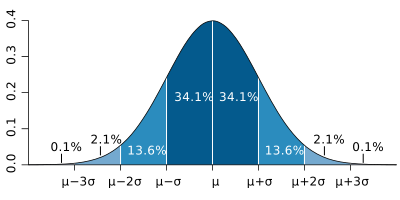
The normal distribution is often referred to as the “bell curve” because of its characteristic shape. In statistics, we often denote the normal distribution as or , where is the mean and is the standard deviation. Thus, when a random variable is normally distributed with mean and standard deviation , we can express as .
SciPy provides an object called norm in the submodule scipy.stats. This object supports a wide range of operations for working with the normal distribution. For example, we can compute the probability density function (PDF) of a normal distribution—that is, the value of the distribution at a given point—using norm.pdf. The PDF is defined as
where is the mean and is the standard deviation. The function call norm.pdf(x, loc=0, scale=1) evaluates the PDF at a value , where loc corresponds to the mean and scale corresponds to the standard deviation .
The code below calculates the probability density of a normal distribution with mean 0 and standard deviation 1 at , which lies one standard deviation () to the right of the mean.
from scipy.stats import norm
norm.pdf(1)
Probably more useful is the function norm.cdf, which calculates the cumulative distribution function (CDF) of a normal distribution. The CDF gives the probability that a random variable is less than or equal to a given value; i.e., the area under the normal distribution curve up to . It is defined as
where is the error function. Try the following code for finding the probability of finding a random variable with a value less than or equal to (from to center) in a normal distribution with mean 0 and standard deviation 1.
norm.cdf(0)We can also evaluate the CDF at two points, say and , and subtract the two values to get the probability that a random variable is between -1 and 1 (within ).
norm.cdf(1) - norm.cdf(-1)The result is about 0.68, or 68%, which matches the value shown in the figure at the beginning of this subsection.
Of course, there are many other types of distributions as well, and we will cover them in Lesson 4.5.
Exercise (this is a great one—it demonstrates one of the most important theorems in statistics!): The central limit theorem (CLT) states that the distribution of the sample mean from a large number of independent random variables will approach a normal distribution, regardless of the original distribution of the variables.
In this exercise, we will verify this theorem by calculating the sum of n random variables, each variable is drawn from a uniform distribution from 0 to 1 (as its name suggests, the random variables are uniformly distributed between 0 and 1). The following code imports a customized script that can plot an interactive figure with a normal curve and the sum of n random variables. You can check to the clt.py file in the same path to see how it works.
import clt
clt.show_plot()
Try to adjust the slider to see how the histogram changes compared to the reference normal curve as n increases. Do you think the CLT holds for this case? What about for other distributions? You may try to change the script clt.py to use other distributions once you think you understand the code.
Random Numbers
Legacy Mode
Warning: The usage described in this subsection is no longer recommended and is only provided to help understand older codes. For recommended usage, see the next subsection for the contemporary implementation.
We often need to generate random numbers for simulations, data analysis, and other purposes. NumPy provides a wide range of functions for generating random numbers, including:
| Function | Description |
|---|---|
np.random.rand() | Generate random numbers in the range from a uniform distribution. |
np.random.randn() | Generate random numbers from a standard normal distribution. |
np.random.randint() | Generate random integers in the range from a uniform distribution. |
np.random.choice() | Generate random samples from a given 1-D array. |
np.random.shuffle() | Randomly permute a sequence, or return a permuted range. |
np.random.seed() | Set the seed for the random number generator. |
The simplest way to generate a random number is to call the function np.random.rand() without any arguments:
np.random.rand()To generate an array of random numbers, pass the desired shape as positional arguments to np.random.rand():
np.random.rand(3, 2)The function np.random.randn() generates random numbers from a standard normal distribution (mean 0, standard deviation 1). The usage is similar to np.random.rand():
np.random.randn(3, 2)If you want to generate random integers, you can use np.random.randint(). Unlike the previous two functions, np.random.randint() takes two arguments: the minimum and maximum values of the range. To specify the shape of the output array, pass the shape as a tuple to the size keyword argument:
np.random.randint(1, 10, size=(3, 2))The function np.random.choice() generates random samples from a given 1-D array. Like np.random.randint(), pass the shape as a tuple to the size keyword argument:
np.random.choice(np.array(['apple', 'banana', 'blueberry', 'peach', 'strawberry']), size=(3, 2))Note that np.random.choice() only accepts 1-D arrays as input, otherwise it will raise an error. Try to run the following code and see what happens:
np.random.choice(np.random.rand(3, 2))If we pass a positive integer instead of 1-D array to np.random.choice(), it will treat the integer as a range. For example, the following code generates random integers in :
np.random.choice(10, size=(3, 2)) # Equivalent to `np.random.choice(np.arange(10), size=(3, 2))`The default behavior of np.random.choice() is to generate random samples with replacement. To generate random samples without replacement, pass replace=False to the np.random.choice() function:
np.random.choice(10, size=(3, 2), replace=False)Note that when replace=False, the total number of samples must always be less than or equal to the size of the array. For example, the following code will raise an error:
np.random.choice(2, size=(3, 2), replace=False)There is another parameter called p that can be used to specify the probabilities of each element in the array. For example, the following code generates random samples from the array [0.1, 0.2, 0.3, 0.4, 0.5] using the same array as probabilities:
probs = np.array([0.1, 0.2, 0.3, 0.4, 0.5])
np.random.choice(probs, size=(3, 2), p=probs/probs.sum())
Note that the sum of the probabilities must be equal to 1. For numerical arrays we can simply use the sum() method to normalize the probabilities, which is what probs/probs.sum() actually does.
The function np.random.shuffle() randomly permutes a sequence in place. It does not return a new array, but rather modifies the input array directly. For example:
arr = np.array([1, 2, 3, 4, 5])
np.random.shuffle(arr)
arr
Finally, the function np.random.seed() sets the seed for the random number generator. The seed is used to generate random numbers reproducibly. Usually, if we want to generate the same random numbers every time, we need to set the seed before generating random numbers. For example, the following code generates the same random numbers every time:
np.random.seed(42)
np.random.rand(3, 2)
Contemporary Mode
From version 1.17, NumPy introduced a new system for random number generation, which is recommended for new code by default. To use the new system, we should create an independent generator with a seed before generating random numbers. For example:
rng = np.random.default_rng(42)
rng
This approach has an advantage: even if a module we import modifies the global random number settings used by the legacy mode, it will not affect our newly created generator. Most of the functions in legacy mode are still available as methods of the generator with the same name, except the most common ones. The np.random.rand(), np.random.randn(), and np.random.randint() are now called rng.random(), rng.normal(), and rng.integers(), respectively. For example:
rng.random(size=(3, 2)), rng.normal(size=(3, 2)), rng.integers(10, size=(3, 2))Notice that the rng.random() and rng.normal() take the size argument as a tuple like other functions.
Exercise : Monte Carlo method is a popular technique for estimating numerical values using random sampling. In one sentence, this method can be visualized as throwing a lot of beans on a piece of land uniformly and calculating the proportion of beans that fall into a given area.
In this exercise, we will use the Monte Carlo method to estimate the value of . The idea is to randomly generate points uniformly in a square that bounds a quarter circle and calculate the proportion of points that fall inside the quarter circle. Let’s do this step by step.
Set up the random number generator with a seed.
Determine the number
Nof random points to generate.Generate
Nrandom points in a square of side length 1 using uniform distribution.Calculate the number
Mof points that fall inside the quarter circle .The proportion
M/Nindicates the area of the quarter circle, which is .Use the result to estimate the value of and then compare it with
np.pi.
Fitting
Do you remember in the last lesson on data visualization when Van Nya made a rather poor attempt at fitting the molar absorptivity of methylene blue? As it turns out, he wasn’t even measuring methylene blue, but some other unknown compound. In that case, how can we determine the molar absorptivity of this mystery species? The key is to fit the data to a straight line and use the slope to get the molar absorptivity. This is exactly what the machinery of fitting, which we’ll introduce in this section, is designed to do.
Linear Fitting
For fitting the molar absorptivity, it’s easy to just perform a linear fitting (or linear regression) since Beer’s law is a linear equation.
We will use a function called np.polyfit() to perform the fitting. The function takes the following arguments:
np.polyfit(x, y, deg, cov)Here x and y are the data sets, and deg is the degree of the polynomial to fit. The optional argument cov is used to calculate the covariance matrix of the fitted parameters, which will be covered later.
Let’s take a look of the data from the last lesson:
data_conc = np.array([2.34, 4.69, 9.38, 18.76, 37.52]) * 1e-6
data_absor = np.array([114, 514, 810, 1919, 3810]) * 1e-3

fit = np.polyfit(data_conc, data_absor, deg=1)
fit
The return values of np.polyfit() are the coefficients of the fitting equation. The first element of the return value is the slope of the fitting line, and the second element is the intercept of the fitting line. Let’s plot the data and the fitting line to see how well the fitting line fits the data.
fit_x = np.linspace(0, 40e-6, 100)
fit_y = fit[0] * fit_x + fit[1]

plt.plot(data_conc, data_absor, marker='^', linestyle='', label='Van Nya\'s Data')
plt.plot(fit_x, fit_y, linestyle='--', label='Fitting Line')

plt.xlabel('Concentration (M)')
plt.ylabel('Absorbance')
plt.title('Van Nya\'s Data and Fitting Line')

# This part displays the equation of the fitting line
equation = f'$y = ({fit[0]:.3g})x + ({fit[1]:.3g})$'
plt.text(2.3e-5, 2, equation) # the first two arguments are the x and y coordinates of the text, and the third argument is the text to display

plt.legend()

plt.show()
If you are not familiar with the code like f'$y = ({fit[0]:.3g})x + ({fit[1]:.3g})$', it’s time to go back to Lesson 1.5 to learn how to use the string formatting feature of Python!
According to the fitting line, the molar absorptivity of the unknown compound is about . You will notice a nonzero intercept, but it’s tiny compared to the slope, so it won’t be a concern.
Sometimes we want to know the uncertainty of the fitting parameters. We can use the np.polyfit() function again, but this time we will set the optional argument cov to True. The return value of np.polyfit() will be a tuple of two arrays, which contain the coefficients and the covariance matrix of the fitting parameters.
fit, cov = np.polyfit(data_conc, data_absor, deg=1, cov=True)
fit, cov
The covariance matrix of the fitting parameters is a 2D array with shape (deg + 1, deg + 1). The diagonal elements of the matrix are the variances of the fitting parameters, and the off-diagonal elements are the covariances between the fitting parameters. Commonly, we use the diagonal elements to get the standard deviations of the fitting parameters by taking the square root of them:
std_fit = np.sqrt(np.diag(cov)) # `np.diag()` returns the diagonal elements of an array
std_fit
Then, you can attach the standard deviations to the fitting parameters and display them in a figure.
plt.plot(data_conc, data_absor, marker='^', linestyle='', label='Van Nya\'s Data')
plt.plot(fit_x, fit_y, linestyle='--', label='Fitting Line')

plt.xlabel('Concentration (M)')
plt.ylabel('Absorbance')
plt.title('Van Nya\'s Data and Fitting Line')

equation = f'$y = ({fit[0]:.3g} \pm {std_fit[0]:.3g})x$ \n $+ ({fit[1]:.3g} \pm {std_fit[1]:.3g})$'
plt.text(4e-5, 1.5, equation, ha='right') # if you include `ha='right'`, the text will be aligned to the right

plt.legend()

plt.show()
In addition, sometimes we also want to know the coefficient of determination ( score) of the fitting. The higher the score, the better the fitting. Unfortunately, np.polyfit() doesn’t have a function to return the score directly, so we will implement a function r2_score() from another famous library for machine learning: Scikit-learn. The details of the r2_score() function can be found in the documentation.
from sklearn.metrics import r2_score

y_pred = fit[0] * data_conc + fit[1]
R2 = r2_score(data_absor, y_pred)
R2
Plotting together, we have:
plt.plot(data_conc, data_absor, marker='^', linestyle='', label='Van Nya\'s Data')
plt.plot(fit_x, fit_y, linestyle='--', label='Fitting Line')

plt.xlabel('Concentration (M)')
plt.ylabel('Absorbance')
plt.title('Van Nya\'s Data and Fitting Line')

equation = f'$y = ({fit[0]:.3g} \\pm {std_fit[0]:.3g})x$ \n $+ ({fit[1]:.3g} \\pm {std_fit[1]:.3g})$ \n $R^2 = {R2:.4g}$'
plt.text(4e-5, 1.3, equation, ha='right')

plt.legend()

plt.show()
Polynomial Fitting
The np.polyfit() function can also be used to fit a polynomial with degree greater than 1. For example, we can fit a free-fall model to the data of the free-falling of a ball. Recall that the free-falling equation is:
Here is the height of the ball, is the time, is the acceleration due to gravity, is the initial velocity, and is the initial height.
Suppose that we want to find the values of . Here, we will use this dataset from Khan Academy.
height = np.array([2.00, 1.90, 1.56, 0.92, 0.30])
time = np.array([0.00, 0.15, 0.28, 0.49, 0.58])

fffit, ffcov = np.polyfit(time, height, deg=2, cov=True)
fit_g = fffit[0] * (-2)

print(f'g = {fit_g:.3g} m/s^2')
Well, it seems that this data deviates from the true value, in which . Let’s plot the data and the fitting line to see how well the fitting line fits the data.
t_fit = np.linspace(0, 0.6, 100)
h_fit = fffit[0] * t_fit**2 + fffit[1] * t_fit + fffit[2]

plt.plot(time, height, marker='o', linestyle='', label='Data')
plt.plot(t_fit, h_fit, label='Fitting Curve')

plt.xlabel('Time (s)')
plt.ylabel('Height (m)')
plt.title('Free-Fall Data and Fitting Curve')

eq2 = rf'$y = -\frac{{1}}{{2}} \times {fffit[0]*(-2):.3g}t^2 + {fffit[1]:.3g}t + {fffit[2]:.3g}$'
plt.text(0.42, 1, eq2, ha='right')

plt.legend()
plt.show()
It seems that the fitting line is not very good—probably because the dataset is too small (and has non-negligible errors!). Let’s get the uncertainty by accessing the covariance matrix of the fitting parameters:
std_fffit = np.sqrt(np.diag(ffcov))
std_fffit
By principle of error propagation, we can get the standard deviation of by:
std_g = std_fffit[0] * 2
std_g
Indeed, the standard deviation of is quite large. Some people may still use R^2 to evaluate the goodness of nonlinear fitting, but it is somehow NOT recommended, see BMC Pharmacol. 2010, 10, 6. In any case, it is relatively safe to use standard deviations to evaluate the goodness of nonlinear fitting.
Weighted Fitting
So far, the fitting has treated all data points equally. However, in some cases, we may want to assign different weights to certain data points. For instance, consider the ideal gas law:
This equation describes the relationship between pressure, volume, and temperature for an ideal gas. It assumes that gas molecules are point particles with no intermolecular interactions. While this assumption is unrealistic, the model still provides a good approximation for the behavior of real gases—especially for monatomic gases at high temperatures and low pressures.
Suppose we have experimental data for a real gas, , including its pressure, volume, and standard deviation of pressure. The system contains of gas at 25\, ^\circ \mathrm{C} (). We want to fit the ideal gas law to this data to determine an effective gas constant and compare it with the known ideal gas constant . Let’s start by plotting the data:
co2_data = np.loadtxt('./assets/CO2_vdw.csv', delimiter=',', skiprows=1)

plt.figure(figsize=(8, 5))
# Note that we take the reciprocal of the volume as the input, since p = nRT/V
plt.errorbar(1/co2_data[:, 0], co2_data[:, 1], yerr=co2_data[:,2],
             linestyle='', marker='o', mec='black', mfc='gold', capsize=4, ecolor='black')
plt.xlabel(r'$1/V\, (\mathrm{m}^3)$')
plt.ylabel(r'$P\, (\mathrm{Pa})$')
plt.title(r'Pressure vs. Volume of $ \mathrm{CO_2} $')
plt.grid(ls='--',alpha=0.8)
plt.show()
Now let’s perform a linear fitting:
co2_fit, co2_fit_uncer = np.polyfit(1/co2_data[:, 0], co2_data[:, 1], deg=1, cov=True)
co2_fit[0], np.sqrt(np.diag(co2_fit_uncer))[0]
The initial results don’t make sense. Recall that np.polyfit() with deg=1 estimates a straight line with slope and intercept. In our case, the slope of the ideal gas law is:
Thus, to extract the gas constant, we must divide the fitted slope by . Since , we only need to divide by 298.
co2_R = co2_fit[0] / 298
co2_R
Hmmm... This seems close to the ideal gas constant. Let’s bring the standard deviation into this play:
co2_stdev = np.sqrt(np.diag(co2_fit_uncer))[0] / 298
print(f'R_CO2 = ({co2_R:.3f} ± {co2_stdev:.3f}) J K^-1 mol^-1')
The standard deviation of the fitted values is relatively small compared to the gas constant. However, even adding this deviation to does not bring it close to the ideal gas constant . The reason is clear: is not an ideal gas. Still, real gases behave more ideally at lower pressures. This suggests that we should give less weight to high-pressure data and more weight to low-pressure data.
np.polyfit() has a parameter w that can be used to assign weights to the data points. This works the same way as described earlier in the section on weighted mean. The parameter takes a 1D array of the same length as the number of data points. Each weight corresponds to a data point and scales its contribution to the fit. For example, if we want to give higher weight to the low-pressure data, we can set the weight to be , where is the pressure. Let’s try this:
co2_fit_inverse_P, co2_fit_uncer_inverse_P = \
    np.polyfit(1/co2_data[:, 0], co2_data[:, 1], deg=1, cov=True, w=1/co2_data[:, 1])
print(f'R_CO2 = ({co2_fit_inverse_P[0]/298:.3f} ± \
{np.sqrt(np.diag(co2_fit_uncer_inverse_P))[0]/298:.3f}) J K^-1 mol^-1')
See? This time the fitted is closer to the ideal gas constant. Is there a way to get even closer? We notice that the standard deviation of the pressure data, , is also larger at higher pressures, so we can use as the weight—this is called inverse-variance weighting, where the errors of the products w[i]*y[i], with w[i] as the individual weight and y[i] as the data points, all have the same variance (and standard deviation).
co2_fit_inverse_sigma, co2_fit_uncer_inverse_sigma = \
    np.polyfit(1/co2_data[:, 0], co2_data[:, 1], deg=1, cov=True, w=1/co2_data[:, 2])
print(f'R_CO2 = ({co2_fit_inverse_sigma[0]/298:.3f} ± \
{np.sqrt(np.diag(co2_fit_uncer_inverse_sigma))[0]/298:.3f}) J K^-1 mol^-1')
This time the fitted is even closer to the ideal gas constant. Furthermore, we can combine with the inverse of the standard deviation , giving , and use this as the weight:
co2_fit_inverse_ps, co2_fit_uncer_inverse_ps = \
    np.polyfit(1/co2_data[:, 0], co2_data[:, 1], deg=1, cov=True, w=1/(co2_data[:, 1]*co2_data[:, 2]))
print(f'R_CO2 = ({co2_fit_inverse_ps[0]/298:.3f} ± \
{np.sqrt(np.diag(co2_fit_uncer_inverse_ps))[0]/298:.3f}) J K^-1 mol^-1')
Now the fitted is quite close to the ideal gas constant. While it isn’t perfect, it’s reasonable because is, after all, not an ideal gas.
Curve Fitting
np.polyfit() is only able to fit a polynomial. That is, a function in the form
However, in reality, lots of functions are not polynomials. Recall the Morse potential we introduced in the last lesson:
This is clearly not a polynomial, and it can’t be turned into a simple linear (polynomial) form either. For fitting this potential, we will use the curve_fit() function from the SciPy library. First import the function:
from scipy.optimize import curve_fitThe curve_fit(f, xdata, ydata, p0, sigma, ...) function takes the following major arguments:
f: the function to be fittedxdata: the x-coordinates of the data pointsydata: the y-coordinates of the data pointsp0: the initial guess of the fitting parameterssigma: the uncertainties of the data points
The first three arguments are required, and the remaining are optional. More arguments can be found in the documentation. The first step of using curve_fit() is to define the function to be fitted. Here, we will define the morse potential again:
def morse(r, De, a, r0):
    return De * (1 - np.exp(-a * (r - r0)))**2
We are going to fit , , and for a molecule. The data was generated from a computation simulation at CCSD(T)/cc-pCVQZ level. Read the data from the file CO_energy.csv.
data = np.loadtxt('./assets/CO_energy.csv', delimiter=' ')
r = data[:, 0] # angstrom
E_h = data[:, 1] # hartree
Here the unit of energy is hartree. This is a commonly used unit in quantum chemistry, which has the relationship:
We need to convert the unit of energy from hartree to eV for further comparison. You can definitely multiply E_h by 27.211, but here we will provide with a more accurate way; that is, use a tabulated conversion factor from scipy.constants.
from scipy.constants import physical_constants
factor, *_ = physical_constants['Hartree energy in eV'] # we use `, *_` to drop the rest of the tuple returned by `physical_constants['Hartree energy in eV']`
factor
More constants can be found in the documentation.
Now perform the conversion and shift the minimum to zero:
E_eV = E_h * factor
E_eV -= np.min(E_eV)
E_eV
Take a look first by visualizing the data:
plt.plot(r, E_eV, marker='o', linestyle='', label='Data')

plt.xlabel(r'$r\ (\mathrm{\AA})$')
plt.ylabel(r'$E\ (\mathrm{eV})$')
plt.title('Potential Energy Surface of CO')

plt.show()
We can now fit the Morse model.
morse_fit = curve_fit(morse, r, E_eV, p0=(10, 1, 1)) # the initial guess was chosen for De=10, a=1, r0=1
morse_fit
The output is a tuple of two arrays. The first array is the fitting parameters, and the second array is the covariance matrix of the fitting parameters. We can check the standard deviation of the fitting parameters:
std_morse_fit = np.sqrt(np.diag(morse_fit[1]))
std_morse_fit
Now plot the data:
r_fitted = np.linspace(0.8, 2.0, 100)
morse_fitted = morse(r_fitted, *morse_fit[0])

plt.plot(r, E_eV, marker='o', linestyle='', label='Data')
plt.plot(r_fitted, morse_fitted, linestyle='-', label='Morse Fitting')

plt.xlabel(r'$r\ (\mathrm{\AA})$')
plt.ylabel(r'$E\ (\mathrm{eV})$')
plt.title('Potential Energy Surface of CO')

plt.legend()
plt.show()
We can also attach our fitted parameters to the plot:
plt.plot(r, E_eV, marker='o', linestyle='', label='Data')
plt.plot(r_fitted, morse_fitted, linestyle='-', label='Morse Fitting')

plt.xlabel(r'$r\ (\mathrm{\AA})$')
plt.ylabel(r'$E\ (\mathrm{eV})$')
plt.title('Potential Energy Surface of CO')

# This part puts the fitted parameters on the plot, wrapped in a box
params_lines = [
    rf'$D_e = {morse_fit[0][0]:.3f} \pm {std_morse_fit[0]:.3f}\, \mathrm{{eV}}$',
    rf'$a = {morse_fit[0][1]:.3f} \pm {std_morse_fit[1]:.3f}\, \mathrm{{\AA}}^{{-1}}$',
    rf'$r_0 = {morse_fit[0][2]:.3f} \pm {std_morse_fit[2]:.3f}\, \mathrm{{\AA}}$',
]
params_text = '\n'.join(params_lines)

plt.text(1.075, 10.5, params_text, bbox=dict(boxstyle="round", ec='black', fc='grey', alpha=0.25))

morse_text = r'$V_\text{Morse}(r) = D_e \left( 1 - e^{-a \left( r - r_0 \right)} \right)^2$'
annotate_coords = (r_fitted[8], morse_fitted[8])
arrowset2 = dict(facecolor='black', width=0.01, headwidth=4, headlength=4)
plt.annotate(morse_text, annotate_coords, (1.0, 7.5), fontsize=11, fontweight='bold', arrowprops=arrowset2)

plt.grid(linestyle=':')

plt.legend()
plt.show()
For your information, the real data (collected from spectroscopy) is , , and . Do you find any discrepancy between the fitted parameters and the real data (it might be significant)? If so, think about what might be the reasons.
In the example above, we fitted three parameters: , , and . Sometimes a wide range of parameters is good, but in some cases, this can cause overfitting. In fact, we can also fit fewer parameters. For example, we can fit only, and pre-define the value of and using values from the database. For this, you need to define a new function that takes only and as input:
def morse_1param_CO(r, De):
    return De * (1 - np.exp(-2.32 * (r - 1.128)))**2
Now we can use curve_fit() to fit the function:
morse_1param_CO_fit = curve_fit(morse_1param_CO, r, E_eV, p0=10)
morse_1param_CO_fit
Try to visualize:
morse_fitted_1param = morse_1param_CO(r_fitted, *morse_1param_CO_fit[0])

plt.plot(r, E_eV, marker='o', linestyle='', label='Data')
plt.plot(r_fitted, morse_fitted_1param, linestyle='-', label='Morse 1-Param Fitting')

plt.xlabel(r'$r\ (\mathrm{\AA})$')
plt.ylabel(r'$E\ (\mathrm{eV})$')
plt.title('Potential Energy Surface of CO')

params_text_1param = rf'$D_e = {morse_1param_CO_fit[0][0]:.3f} \pm {morse_1param_CO_fit[1][0][0]:.3f}\, \mathrm{{eV}}$'

plt.text(1.075, 10.5, params_text_1param, bbox=dict(boxstyle="round", ec='black', fc='grey', alpha=0.25))

annotate_coords_1param = (r_fitted[8], morse_fitted_1param[8])
plt.annotate(morse_text, annotate_coords_1param, (1.0, 7.5), fontsize=11, fontweight='bold', arrowprops=arrowset2)

plt.grid(linestyle=':')

plt.legend()
plt.show()
Exercise : Try again for a two-parameter Morse potential, fitting and . Make a plot like the one above. You don’t need to put all code in a single cell—create as many cells as you need!
Determine which one (1-parameter, 2-parameter, or 3-parameter) is better for fitting the Morse potential.
Exercise (this is also important!): Remember the sigma argument in curve_fit()? Actually we can also perform a weighted curve fitting, just like what we did with np.polyfit(). For testing this, the blackbody radiation will be a great example.
The Planck’s law describes the relationship between the temperature of a blackbody and its spectral radiance (intensity per wavelength), given by:
Here is the wavelength, is the temperature, is the speed of light, (sometimes denoted just as ) is the Boltzmann constant, and is our old friend—the Planck constant.
In this exercise, suppose we have a set of experimental data—the measured intensities at various wavelengths for an unknown temperature. Our goal is to fit this data using Planck’s law to determine the temperature that best describes the observed spectrum. This time, we will use solar radiation data as an example (isn’t that cool?), where the data is stored in the file blackbody.csv (data taken from SORCE, LASP, University of Colorado Boulder; the dataset has been truncated for ease of processing; irradiance was converted to radiance through proper calculation). The first column is the wavelength, the second column is the intensity, and the third column is the uncertainty of the intensity.
For better fitting, we can perform a weighted curve fit. Here, we will use the same technique of inverse-variance weighting. However, the sigma argument in curve_fit() is different from the w argument in np.polyfit(). It is not the weight we designed for the data points; rather, it represents the uncertainty of our y-data. Thus, if we have a set of data points y along with their uncertainties y_uncertainty, we can simply use sigma=y_uncertainty in curve_fit().
Now it’s your turn!
The code below could be helpful:
# import necessary constants, so you don't need to type them by hands
from scipy.constants import h, c, k
Another hint: take care of your units! You may need to convert to properly.
Again... the last hint: what is your initial guess p0 for the temperature? Search online!
bb = np.loadtxt('./assets/blackbody.csv', delimiter=',', skiprows=1)
bb[:, 0] = bb[:, 0] * 1e-9
bb[:, 1] = bb[:, 1] * 1e9
bb[:, 2] = bb[:, 2] * 1e9

plt.figure(figsize=(8, 6))
plt.errorbar(bb[:,0],bb[:,1], yerr=bb[:,2], marker='o', mfc='None', mec='black', ms=5, linestyle='', label='Data')
plt.show()
bb_lambda = np.linspace(200e-9, 2500e-9, 500)
plt.figure(figsize=(8, 6))
plt.errorbar(bb[:,0],bb[:,1], yerr=bb[:,2], marker='o', mfc='None', mec='black', ms=5, linestyle='', label='Data')
plt.plot(bb_lambda, blackbody(bb_lambda, solar_temp), linestyle='--', label='Blackbody Fitting')
plt.legend()
plt.show()End-of-Lesson Problems
Problem 1: Michaelis–Menten Kinetics
The Michaelis–Menten kinetics model is a commonly used model to describe the kinetics of enzyme catalysis. For an enzymatic reaction
the Michaelis–Menten equation is:
where is the rate of reaction, is limiting rate approached by the system at saturating substrate concentration for a given enzyme concentration, is the Michaelis constant, defined as
and is the substrate concentration.
Penicillin is degraded by the enzyme penicillinase, which catalyzes the breakdown of the antibiotic’s -lactam ring. This enzymatic reaction was investigated by measuring how much penicillin was hydrolyzed after one minute at several initial substrate concentrations. A small, fixed amount of purified enzyme was used, and the reaction volume was maintained at . The resulting kinetic data, showing the dependence of reaction rate on substrate concentration, are provided in penicillinase_kinetics.csv.
Treat the amount hydrolyzed () as the rate per minute (since all reactions were measured after 1 minute). Then use curve_fit to find and , and report their associated standard deviation.
Data is taken from Biochemistry: A Short Course, 4th ed, ISBN 9781319114633.
Problem 2: Hammett Equation—a Linear Free-Energy Relationship (LFER)
In physical organic chemistry, the Hammett equation quantitatively relates the effect of substituents on the rate or equilibrium constant of a reaction involving aromatic compounds. It is expressed as:
where is the rate constant for a substituted compound, is that for the unsubstituted (hydrogen) compound, is the substituent constant (electron-withdrawing or -donating effect), and is the reaction constant, describing how sensitive the reaction is to electronic effects.
Suppose that you performed a study on the base-catalyzed hydrolysis of para-substituted ethyl benzoates. The reaction is shown below.

The measured rate constants at 25 °C and known substituent constants () are:
| Substituent | ||
|---|---|---|
| –0.27 | 2.18 | |
| –0.17 | 2.01 | |
| 0.00 | 1.00 | |
| +0.23 | 0.64 | |
| +0.78 | 0.26 |
Here the unsubstituted compound () serves as the reference, so .
Your tasks:
For each substituent, calculate the relative rate ratio .
Fit the Hammett equation using a fitting algorithm you preferred. Report the slope and intercept. Interpret the sign of : does the reaction favor electron-donating or electron-withdrawing groups?
Make a plot of vs. as points. Overlay the fitted line from your fitting. Include the fitted equation and value on the plot.
Suppose the measured values have a 5% experimental uncertainty, normally distributed around each measurement. Use
rng.normal()to generate 100 random datasets around for each substituent. You must use the contemporary method; that is, use the random number generator! Refit the Hammett equation each time to obtain a distribution of values. Plot a histogram of the simulated values and compute their mean and standard deviation.What does the spread in the simulated values tell you about the reliability of your experimental results? Based on your best-fit , discuss whether this reaction proceeds through a build-up or depletion of negative charge at the reaction center in the transition state.
Charles J. Weiss’s Scientific Computing for Chemists with Python
GenAI for making paragraphs and codes(・ω< )★
And so many resources on Reddit, StackExchange, etc.!
Acknowledgments
This lesson draws on ideas from the following sources:
- Spiess, A.-N., & Neumeyer, N. (2010). An evaluation of R2 as an inadequate measure for nonlinear models in pharmacological and biochemical research: a Monte Carlo approach. BMC Pharmacology, 10(1). 10.1186/1471-2210-10-6